Thursday, April 30, 2015

How To Break Down A Brick Wall


It happens, or will happen, to all of us.  Your family history research comes to a screeching halt.  The trail goes cold.  You can't find any more information on an ancestor.  You try everything you know and you get nowhere.  We call it a brick wall.

Ancestry.com recently posted an interesting piece on their blog about knocking down one of these obstacles.  Someone wrote in asking Ancestry.com how to find out more information about her grandfather.  The experts then proceeded to break down the wall and dig up the elusive details.  It is a wonderful example of how this is done and an interesting story to boot!

I hope you will take a minute to read Window Through A Widow's Pension posted by the Ancestry team on 22 April and see if it might give you some ideas on how to break down a wall or two of your own.

-- submitted by Denise Doyon

Tuesday, April 28, 2015

66 Places To Find A Female Maiden Name

Reposted from Colonial Roots


Just when you thought you had searched everywhere ...

The search for a female maiden name is often one of the most elusive searches in our family history. You first need to identify the records that may contain the maiden name of your female ancestor. A basic list of records containing this information is shown below.

Birth Records
Birth certificates, including delayed birth records and corrected birth records
Newspaper birth announcements
Family lore and oral histories
Published biographies and genealogies
Journals and diaries
Family Bibles

Marriage Records
Marriage certificates
Marriage applications & licenses
Newspaper wedding announcements
Family Bibles

Divorce Records
Newspaper announcements
Court proceedings: early records may appear in Chancery Court records
County divorce records

Death Records
Death certificates
Burial permits or transfer papers (if the death occurred out of state)
Newspaper announcements, including obituaries and death notices
Funeral records, including funeral cards

Cemetery Records
Sexton’s office (cemetery office, caretaker’s office)
Tombstone inscriptions
Note: a clue can be found by studying those buried adjoining the deceased

Census Records
Names of in-laws may be included in a family grouping
1890 Veteran’s census including widows of veterans
1925 Iowa State Census (the only U.S. census with the question, “Maiden Name of Mother?”)
Names of neighbors may contain clues
Clues from parents birthplace

Online Databases & Indexes
Google search
FamilySearch.org search
Ancestry.com, search family trees for clues
RootsWeb (archives) family name search
Name indexes
Online family trees

Vital Records Indexes & Compilations (some are online)
Kentucky birth/death index (one of the states whose records are available on the Internet)
The Barbour Collection (for Connecticut, a published compilation)
New England vital records (published town reports)
RootsWeb (archives) county pages may include county-wide indexes
Bible records: some are online (Virginia, North Carolina, and Louisiana); others may be found through relatives and church collections

Probate Records
Wills: a woman may be named by her married name in her father’s will
Administration records (same as above)
Appointments of administrators/executors (can provide a clue to the wife’s family name)
Estate settlements (may also be known as distributions or fiduciary accounts)

Church Records
Baptisms and christenings: pay close attention to the surnames of the sponsors or godparents
Confirmations
Church membership lists or class lists
Vestry minutes
Marriages
Deaths
Burials

Miscellaneous
Civil War soldiers & sailors online index
Veterans’ pension files: Revolutionary War, War of 1812, Civil War
Family correspondence and other family heirlooms
Family lore and oral interviews
Lineage society membership applications
Deeds and other land records
Civil court records (including Chancery Court)
Criminal court records
Newspaper articles: your ancestor may be mentioned in an article other than birth, marriage, or death notice
Social Security applications
Draft registration record
Driver’s license application
Samplers and Frakturs (often contain family names)
Records of fraternal organizations, including newsletters and other publications
Homestead record
Immigration and naturalization records
Insurance papers
Military records, including medical and burial records
Professional license applications
Passports applications
Genealogy newsletters, publications, and websites (queries)
Voter registrations
Immigrant aid societies


Finding a female maiden name becomes a bit easier—if you know where to look. Have you found an ancestor’s maiden name in an unusual place?

Monday, April 27, 2015

Movie Mondays


So you are getting ready to begin your search, and Linda and I have been busy trying to supply you with the information and tools you need to get started. It's daunting. Sometimes, even overwhelming. We know. We were once just starting out, too.

In researching ways to make it easier to teach all of you the basics, I stumbled upon a number of wonderful videos sponsored by the Family History Library.  These are very cool because the videos are very well done, most of us learn best by being shown how to do things, and these lessons use the quintessential free resource - FamilySearch.org.  What's not to like!

Starting today, we are launching a series called "Movie Mondays".  Each Monday we will post the link to a video we hope you will enjoy and find useful as you begin digging into your family roots.

This week we are offering the first in a series of short videos entitled "5 Minute Genealogy". Who doesn't have five minutes to learn something new?  When you click on the link supplied below, take note of the information listed below the grey "View This Lesson" box.  In the case of the first episode, you will find a link to a PDF lesson handout.  Just click on the link and you will get a nifty one-page handout you can print or download to your computer for future reference.

PLEASE NOTE:  If you are using a PC you may be prompted to download Microsoft's Silverlight program.  It only takes a minute and will enable you to run the videos on your Windows PC.  I found that the videos work best using Internet Explorer or Mozilla Firefox.  Even though they say the videos will run well on Google Chrome, that has not been true for me.  Linda and I discovered that these videos do not run on tablet devices.  If you are using an Apple computer you may be prompted to download a program such as the "Spotlight" plug-in to enable you to watch these videos.

Here is the link for the first episode. If you need a link to copy and paste into an alternative browser:  https://familysearch.org/learningcenter/lesson/5-minute-genealogy-episode-1-quick-start/234.

Now get out there and find some ancestors!

-- submitted by Denise Doyon


The Future of Genealogy - 6 Predictions


Reposted from Behold Genealogy - 7 Apr 2015 by Louis Kessler

There’s been a lot happening the past few years. As I’ve developed Behold, I’ve tried to stay aware of the trends in the genealogy field and the expectations of genealogists of their genealogy software.

I was very inspired by James Tanner’s blog post yesterday titled: Expanding Our View of What is Possible in Genealogical Research. James correctly says that the old way of doing genealogy that we all did 30 years ago is gone. In other words, we no longer have to travel to the library, vital statistics office, or archives and laboriously track down all the bits of information we need to put our ancestors together piece by piece. No. Technology has fallen upon us. It allows us to sit comfortably in our house on our computers and search and find more records and connect with more people and more relatives that we ever could have imagined possible.

The world has changed. Here is my expectation of what is coming:


More Interest in Genealogy
Companies such as Ancestry, FamilySearch and MyHeritage have been claiming tens of millions of subscribers. I’ve heard that MyHeritage is adding thousands of new users each day. Over 20,000 people were at RootsTech in Salt Lake City this year. Who Do You Think You Are and Genealogy Roadshow are now regular programming on major networks.

Why is this? Because technology has turned genealogy from a niche hobby for only the most studious meticulous researchers to one that can be done by anyone with an internet connection.


Everything Digital

One of the most tedious tasks 30 years ago was paper, and writing up your family information, and organizing it, and storing it.

It’s becoming a digital world. Everything is getting scanned. It can be saved online, or shared in the cloud, and organized in folders and every word can be indexed so anything can be found.

Genealogy software developers are learning as well that people want/need to record their assumptions and reasoning so programs are starting to make that possible and incorporate these features. The data is digitally transferred to your smartphone so you can take it with you. Your camera, scanner, social network, online browser, cloud data and genealogy tool is becoming one device that you carry around with you wherever you go.


Online Data and Online Trees Ad Infinitum

There are so many online repositories and so many online records, it is getting to the point that no one person has enough time in their lifetime to research all there is about their family.

The online services now give you smart matches or similarly-named tools that match your data to potential family trees or records that may or may not be pertinent to you. You can easily get 10,000 of these “hints” thrust upon you. If you take only 10 minutes to thoroughly review, assess and if necessary incorporate the results of each smart link into your research, that will only take 2,000 hours of your time. By then, you’ll likely have 20,000 new links to check.

This is obviously unmanageable and cannot persist. It means that new tools will be coming to identify and make the dissemination of this information easier. (I’m thinking deeply about this)


Down with Standards. Up with APIs

I’ve been a supporter for years of both the BetterGEDCOM and FHISO initiatives for a new genealogy data communication standard. But I’m now feeling the effort will not get anywhere unless it completely changes its emphasis.

We don’t want to transfer just data anymore. We want to connect the information available at the online repositories and online services to what we have and make corrections, add conclusions and connect the conclusions to their evidence. In other words, we want our data to transfer and connect seamlessly with the online resources.

I really think AncestorSync had the right idea. Connect to everything. Use the Application Programming Interfaces (APIs) of each company to connect your data to theirs. Hide the details of the API from the user and make it seemless to the user. It should just work like magic. Unfortunately, the implementation of that idea was much harder than the even the very smart people at AncestorSync thought, and the effort was abandoned.

But it’s starting again. RootsMagic is connecting to MyHeritage and FamilySearch. FamilySearch has partner sites who interact with its data. And other sites are building public APIs as well.

Once there is a company big enough that connects to everywhere by linking to all these APIs, it will becomes hugely popular, and the genealogical world will take another giant leap.


My Data / My Research

The concept of one world tree is fine. The concept of individual linked trees is also fine. Each has advantages and disadvantages.

But everyone wants/needs to separate out the data that they “know” is true from all the other stuff/junk/conjecture/miscellanea that Joe Blow has put up on some online site. We want to know exactly what we have personally examined and verified and concluded.

So there is still an extreme need for personal genealogy data. The best place for that is still and will always be on your own personal computing device so you can ensure that no one else will update or tamper and destroy what you worked so hard to produce. So desktop software is not dead and will never be (at least until the desktop itself dies).

All you’ll need is that magic API program from #4 and you’ll be set.


Genetics and DNA

The elephant is in the room. The technological advances that made DNA testing affordable to the masses in the past 10 years has taken the world by storm. Millions of people have been tested at several different testing companies and a whole new science of genealogy has been born.

It is really unbelievable what you can do with DNA results when a company has a million other tested people you can compare with. Genealogists are in the “still trying to figure this out” phase, but it’s really simple when you think about it.

You have two genealogies. There’s your traditional genealogy of whom you, your relatives and the records think your ancestors were. Then there’s your genetic genealogy that says who your genetic ancestors were. These two genealogies are not the same. They may not even be close. The rate of genetic NPE (Not the Parent Expected) has been estimated at between 1% and 3% or higher. By the 6th generation, half the ancestors in your genetic tree might not be who you thought they should be.

Genealogy will, by necessity, evolve so that people realize they have multiple ancestries, and will want to trace both their traditional family and their genetic family. People have to smarten up first and realize that there’s a reason why your grandfather does not have a DNA match with you. So don’t promote DNA research through your family until you are absolutely sure no one will get hurt by it!

But this DNA thing is phenomenal. Take it. Embrace it. Use it if you dare.

Saturday, April 25, 2015

Citation Saturday Passenger Lists - Data Base Entries, Manifests and Ship Images


One of the most exciting things I experienced when I first started digging around in my family history was the day I was searching in the Ellis Island Website for information on my German grandparents. I knew they had come to America after their marriage in 1923 and I wanted to see if I could find a record of their arrival.  I was excited to find my grandfather's name in my very first search, and when I clicked on the "see passenger manifest image" I got to see the actual entry of his arrival.  Another click and I got an image of the ship he arrived on.  It was exhilarating!  It was the moment I got hooked.

Any of us who have mined various databases for these records have experienced that thrill.  I made screenshots of the manifest and ship images and filed them somewhere on my computer hard-drive.  Of course, I made no citation, because back then, I was too inexperienced to know that I had to.  And I had no real organizational system for keeping track of stuff back then either.  Not good genealogical practices.  But I digress.

I had to eventually go back and research the information again so that I could cite it all properly.  I used Ancestry.com and was able to reconstruct all but one of the records through their database.

Passenger List - Data Base Entry

Since you have all already gotten to know my maternal grandparents on past Citation Saturdays, I will use my Opa's arrival information for our examples.  When I went back to Ancestry.com to reconstruct my search, this is the record I got:


Notice that this is not an image of the actual manifest, but a summary of that information that Ancestry.com compiles.

Again, using Thomas MacEntee's format (which I will use for all the citations mentioned in this blogpost), the citation would look like this: 

"Passenger Record,"  database Ancestry.com New York Passenger Lists 1820-1957  (http://www.ancestry.com); accessed 27 March 2015, entry for Johannes Voigt, age 30, arrived 9 Dec 1923 on the Derfflinger.

The citation gives you everything you need to know to go back to Ancestry.com and find this again. 

Manifest Image


Although it is too small to read, this is the image from my Opa's arrival on Ellis Island on 9 December 1923.  I found this on Ancestry.com and the citation for this image is:

Manifest, Derfflinger, 9 December 1923, List No 2, Page 46, Line No. 2, for Johannes Voigt, age 30, digital images, Ancestry.com (http://www.ancestry.com): accessed 27 March 2015.  [Roll: T1715, 1897-1957, 3001-4000, Roll 3426]

You would have to blow up the image in order to read the list, page and line numbers, but they are there. The bracketed [ ] information I added at the end is not really necessary, but since Ancestry.com gave me that information when I brought up the image, I decided to add it because I wanted to.  

Ship Images


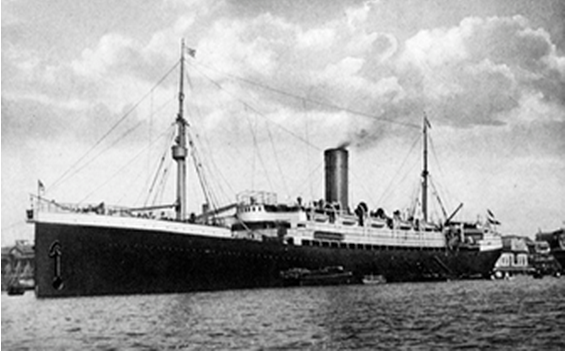
This is a photo of the Derfflinger which I got from the Ellis Island website.  Here is the citation for the image:

Photo of Derfflinger, (Built by Schichau Shipyard, Danzig, Germany, 1907), EllisIsland.org, (www.libertyellisisland.org): accessed 27 March 2015, retrievable by choosing "Ship" link attached to the "Passenger Record" database search results for Johannes Voigt, age 30, arrived 9 December 1923.

Not all that difficult.  Remember, the citation has to give you everything you need to know to go back and find the resource again.  It doesn't have to include any more than that - but if you want to add something that you feel might be useful (like the instruction above for retrieving the record) there are no "citation police" that are going to write you a citation (couldn't resist that ,,,, sorry) for getting creative.

I hope you are finding that this is not as difficult as you thought it was going to be! Citing your sources is a great habit, and one I hope you will acquire moving forward.

Enjoy the weekend!

-- submitted by Denise Doyon


Thursday, April 23, 2015

Blog Comments


I have finally had some time to deal with the "comments" issues on the blog. It appears that Blogger (the platform we use to publish the blog) doesn't deal with comments as intuitively as other platforms. My research led me to three options: change the platform, import a third-party comments gadget or, find a way to work with what we have.

The first and second options are both complicated and time-consuming and in the case of the second, involves learning how to deal with HTML code. Since our readership is relatively small at the moment, we have decided to go with option three.

If you are a Google user, and have a gmail address, you can just comment under your own Google name. If you have a URL, you can use one of those options. Otherwise, we suggest you use the "Anonymous" option when posting a comment. At the end of the comment, just type in your name or, if you prefer, remain anonymous. All comments will be processed as usual - which means they will be moderated before they are posted.

In the event our readership expands, we will revisit the issue and make another decision. For now, we hope this workaround will solve the problem many of you have had trying to post a comment. If you have any questions or concerns, please let us know.

-- submitted by Linda and Denise

D.I.R.T. Education Series


For those of you who were unable to make the first installment of our education series, you can now access the presentations from the blog.  Under the resources tab, scroll down to the section entitled "Presentations".  Click on the bright yellow "here" to access the slides we used for the presentation you missed or, if you did make it to the meeting and want to refresh your memory, you can go through the slides once again.  The first presentation on 22 April 2015 was entitled "In the Beginning".  

Linda and I hope you will enjoy this new meeting format and come away with new and better tools for your own family history journey.  We are always looking for new ideas, so if you have any suggestions about topics you would like us to cover in the series, please let us know.

-- submitted by Denise Doyon